
I've been using Subsonic for just over a month. I was using on the trial without any problems. I purchased the license and now I can't connect. I'm getting a problem with the address that I had registered:
Status: xxxxxxxx.subsonic.org returned HTTP error code 404 Not Found
My forwarding is OK as it worked for a month. Does anyone have anyideas about the server returning a 404 not found error? Do I need to do anything special to my server address after I register?
Thanks!
Jeff
****.subsonic.org is registered, but could not connect
Moderator: moderators
27 posts
• Page 2 of 2 • 1, 2
Same problem
 by Scherer71 » Fri Oct 01, 2010 12:30 am
- Scherer71
- Posts: 4
- Joined: Wed Sep 08, 2010 11:49 pm
Same error
by danroxtar » Sun Oct 03, 2010 1:00 am
I have also been running into this issue. While I'm able to access the my server on my Android while I'm on the same network as my computer, I cannot access it on my phone when I'm on 3G or on a different WiFI network. I have been getting the "XXXXXXXXXX.subsonic.org is registered, but could not connect to it. (ConnectTimeoutException)".
I changed my port number to 8080 and still can't get anything. Any ideas? This is kind of frustrating since I paid for this software and never really got to use it.
I changed my port number to 8080 and still can't get anything. Any ideas? This is kind of frustrating since I paid for this software and never really got to use it.
- danroxtar
- Posts: 1
- Joined: Sun Oct 03, 2010 12:56 am
by holdie » Tue Oct 05, 2010 6:25 pm
I am having the same problem as well - keep getting
[i]Status: xxxxxx.subsonic.org is registered, but could not connect to it. (NoRouteToHostException) [/i]
Even though it says I am successfully forwarding my ports...
I also tried this using manual port forwarding, but that didn't change anything...anyone figure this out yet?
edit: and I also tried changing my port from 80 to 8080 and restarting, no help
[i]Status: xxxxxx.subsonic.org is registered, but could not connect to it. (NoRouteToHostException) [/i]
Even though it says I am successfully forwarding my ports...
I also tried this using manual port forwarding, but that didn't change anything...anyone figure this out yet?
edit: and I also tried changing my port from 80 to 8080 and restarting, no help
- holdie
- Posts: 1
- Joined: Tue Oct 05, 2010 6:14 pm
by jaume » Thu Oct 07, 2010 5:48 pm
Hi there. I am having the same issue. I have tried to follow the steps described earlier about removing the two options under Settings>Network and then adding them one by one from top to bottom.
I will now wait an hour and report back.
I will now wait an hour and report back.
- jaume
- Posts: 62
- Joined: Thu Oct 07, 2010 5:45 pm
by jaume » Thu Oct 07, 2010 7:07 pm
Well, no luck with that... Any ideas? Port is forwarded properly and it is a random port.
Now the text has changed slightly to (NoRouteToHostException) instead of the initial (ConnectTimeOutException)
Note: I have removed my name from the screenshot below.
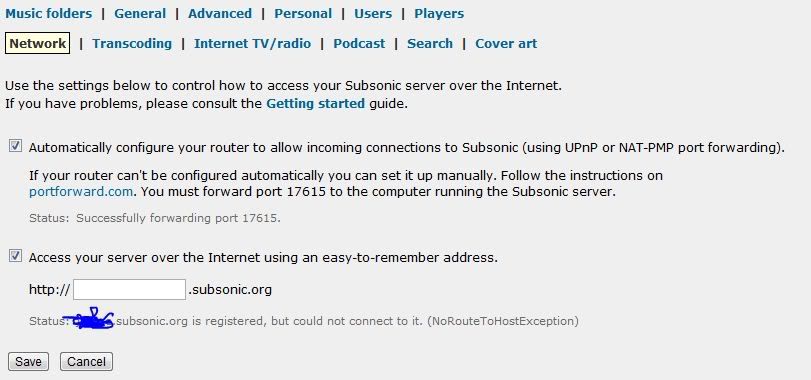
Any ideas why this is happening? Any fixes?
Now the text has changed slightly to (NoRouteToHostException) instead of the initial (ConnectTimeOutException)
Note: I have removed my name from the screenshot below.
Any ideas why this is happening? Any fixes?
- jaume
- Posts: 62
- Joined: Thu Oct 07, 2010 5:45 pm
by jaume » Fri Oct 08, 2010 4:48 pm
Reporting back in case it helps someone else. My server is up and running again. I am not 100% sure what it was, but I have the impression that my router was giving my PC a different IP address that was conflicting with the real one in some way....
Anyways, here is what I did:
1. I stopped the Subsonic service in its control panel
2. I connected the PC directly to the internet modem (without the router) and unplugged my router
3. I started the Subsonic service and tested the connection to the server in the web interface and it was working
4. I stopped the Subsonic service in its control panel again
5. I connected the PC to the modem and the modem to the internet and the mains
6. I started the Subsonic service and tested the connection to the server in the web interface and it was working!!!
Happy days!
Anyways, here is what I did:
1. I stopped the Subsonic service in its control panel
2. I connected the PC directly to the internet modem (without the router) and unplugged my router
3. I started the Subsonic service and tested the connection to the server in the web interface and it was working
4. I stopped the Subsonic service in its control panel again
5. I connected the PC to the modem and the modem to the internet and the mains
6. I started the Subsonic service and tested the connection to the server in the web interface and it was working!!!
Happy days!
- jaume
- Posts: 62
- Joined: Thu Oct 07, 2010 5:45 pm
by sindre_mehus » Sat Oct 23, 2010 8:52 am
Please take a look at the Troubleshooting section of the Getting Started documentation.
Subsonic developer
-

sindre_mehus - Posts: 1955
- Joined: Tue Nov 29, 2005 6:19 pm
- Location: Oslo, Norway
Re: ****.subsonic.org is registered, but could not connect
by anozie » Mon Oct 03, 2011 7:32 am
Had the same issue, I believe the issue is that subsonic is not restarting properly using the subsonic control panel.
What to do?
So, in Windows,
>go to [Control Panel\Administrative Tools].
>Double click [Services].
>scroll down to the S's, Look for "Subsonic" under Name, You should see "Subsonic Music Server (http://subsonic.org)" under Description.
>right click on it, and select properties.
>hit stop, watch the indicator and wait for the subsonic notification icon in the tray to turn red.
>now hit start, wait for the icon to change back to green
>kapish, the server restarts and sends its true current internal ip address the subsonic.org server.
>now just go to YOUR "http://*.subsonic.org" address, and its all gravy (now this is assuming your network forwarding is already done properly)
Enjoy!!
What to do?
So, in Windows,
>go to [Control Panel\Administrative Tools].
>Double click [Services].
>scroll down to the S's, Look for "Subsonic" under Name, You should see "Subsonic Music Server (http://subsonic.org)" under Description.
>right click on it, and select properties.
>hit stop, watch the indicator and wait for the subsonic notification icon in the tray to turn red.
>now hit start, wait for the icon to change back to green
>kapish, the server restarts and sends its true current internal ip address the subsonic.org server.
>now just go to YOUR "http://*.subsonic.org" address, and its all gravy (now this is assuming your network forwarding is already done properly)
Enjoy!!
- anozie
- Posts: 3
- Joined: Mon Oct 03, 2011 7:13 am
Re: ****.subsonic.org is registered, but could not connect
by erandall » Tue Oct 04, 2011 4:28 am
I'm having the same problem. I get the <username.subsonic.com> timeout error. I get connection failed error or connection timed out error from Roku. I am using port 8080 with my localhost Ip address. I do notice when I try to use a third party port checker, it shows and completely different "external" ip address. I suppose this is from my ISP? I've tried everything I can find in the forum, user guides, google searches, ets. This includes static ip, port forwarding, stopping the firewall...nothing helps.
Also, when I connect to subsonic via <username.subsonic.org> I get error The security certificate presented by this website was not issued by a trusted certificate authority. The security certificate presented by this website was issued for a different website's address. I have to continue against the browser best intentions.
Just heard back from my ISP(Utah Broadband). They can't pass through port ids. That can give me a static IP for an extra $5/month; that's the best they can do. I'll be moving to Montana next summer...I'll try Subsonic again then.
Also, when I connect to subsonic via <username.subsonic.org> I get error The security certificate presented by this website was not issued by a trusted certificate authority. The security certificate presented by this website was issued for a different website's address. I have to continue against the browser best intentions.
Just heard back from my ISP(Utah Broadband). They can't pass through port ids. That can give me a static IP for an extra $5/month; that's the best they can do. I'll be moving to Montana next summer...I'll try Subsonic again then.
- erandall
- Posts: 1
- Joined: Tue Oct 04, 2011 4:14 am
Re: ****.subsonic.org is registered, but could not connect
by BKKKPewsey » Wed Oct 05, 2011 12:30 am
erandall wrote:Also, when I connect to subsonic via <username.subsonic.org> I get error The security certificate presented by this website was not issued by a trusted certificate authority. The security certificate presented by this website was issued for a different website's address. I have to continue against the browser best intentions.
If you are getting a certificate error then you are using ssl within subsonic. Unless you install your own certificate then you will get an error as shown.
Nothing to worry about, after all its your site its connecting to, and the stream is encrypted.
However have you set up a non ssl port within SS and will your devices work with that?
Everyone is entitled to be stupid,  but some abuse the privilege!
Due to the confusion from too many genres of music, we have decided to put both country music and rap music into the genre of Crap music.
but some abuse the privilege!Due to the confusion from too many genres of music, we have decided to put both country music and rap music into the genre of Crap music.
-

BKKKPewsey - Posts: 2080
- Joined: Mon May 23, 2011 12:16 pm
- Location: United Kingdom
Re: ****.subsonic.org is registered, but could not connect
by wraithwhispers » Wed Oct 10, 2012 12:00 am
I was also having a problem where if I typed xxxxx.subsonic.org connected to my internal network it would redirect me to the server at 192.168.1.200:4040 and everything was peachy. However, typing in that address gave me the could not connect error. I was running on a CenturyLink Q1000 Modem/Router combo, was being the operative word there. The Q1000 refused to allow me to forward ports manually. Port 4040 was forwarded in UPnP just fine. What I did notice, however, is that it had forwarded port 4040 for IP 127.0.0.1. So, I dug up my old netgear router, put the Q1000 in "transparent bridge" mode, and now I'm using the netgear as the router. The Netgear let me specify my server's IP address and allowed me to manually forward ports. So now it says that port 4040 and 4443 (for HTTPS) is forwarded on IP 192.168.1.200. Now everything is working as it should, and I can access it using mobile apps and the web. I hope this helps someone.
- wraithwhispers
27 posts
• Page 2 of 2 • 1, 2
Who is online
Users browsing this forum: No registered users and 15 guests