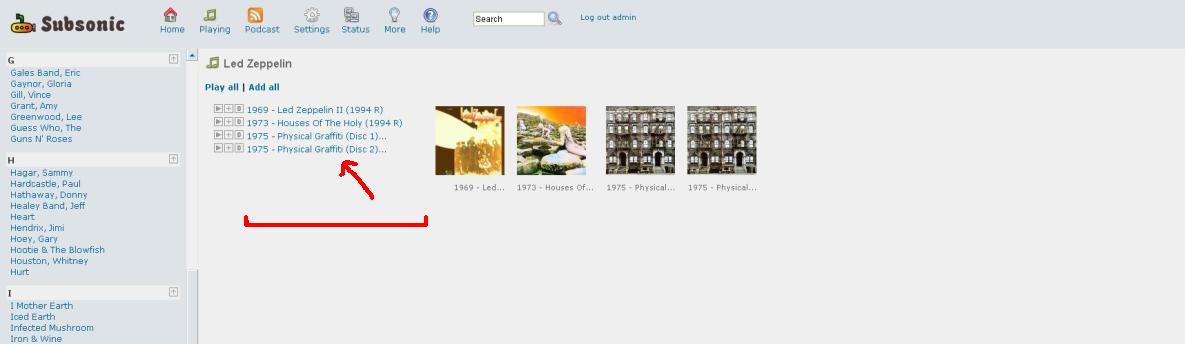
Widening column of album names - FIXED, w/ Pics and HOWTO
 Posted: Sat Jul 26, 2008 8:17 pm
It's been documented here how to change the width of the left frame that shows the list of artists, however....
When you click on an artist, the list of albums appears in the main frame. There's a leftmost column containing the Play, Add to Playlist, and Download icons, a center column with the album title, and then the HUGE right column showing all the album cover arts.
The problem is that the center column displaying the album name is too short. For example, I'm running SS on a Dell 2405FPW monitor at 1920x1200 resolution. Yet, here's what it looks like:
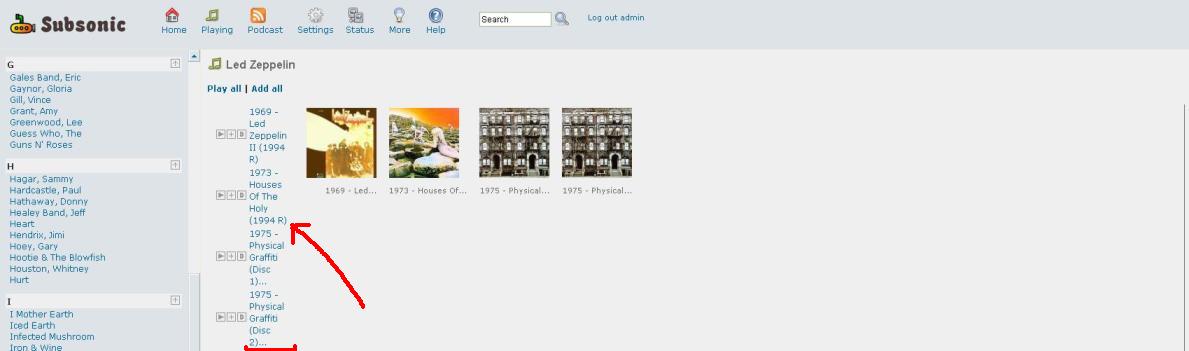
See how the album titles are cramped and taking up 4-5 lines each, despite that TON of room off to the right? I'm not sure how to modify this because it's clearly a table column, not a frame.
Sindre, do you know where in the code this is located? It appears that the table columns are using fixed pixel widths for the 3 icons and the album titles, and that the 3rd column containing all the album art gets "the rest of the screen". I'd like to either increase the fixed size of the album title column, or make it a % width so that it expands as the screen's resolution expands.
Any help is greatly appreciated, and thanks!
Supra92
When you click on an artist, the list of albums appears in the main frame. There's a leftmost column containing the Play, Add to Playlist, and Download icons, a center column with the album title, and then the HUGE right column showing all the album cover arts.
The problem is that the center column displaying the album name is too short. For example, I'm running SS on a Dell 2405FPW monitor at 1920x1200 resolution. Yet, here's what it looks like:
See how the album titles are cramped and taking up 4-5 lines each, despite that TON of room off to the right? I'm not sure how to modify this because it's clearly a table column, not a frame.
Sindre, do you know where in the code this is located? It appears that the table columns are using fixed pixel widths for the 3 icons and the album titles, and that the 3rd column containing all the album art gets "the rest of the screen". I'd like to either increase the fixed size of the album title column, or make it a % width so that it expands as the screen's resolution expands.
Any help is greatly appreciated, and thanks!
Supra92
 What each person wants is up to them, since there's arguments pro and con for fixed-pixel-width vs. % of screen. But here's where you go to change the values: