Subsonic Tray Icon turn into red

Posted:
Sun Feb 27, 2022 4:44 amby asukatabito
I am using Windows 10.
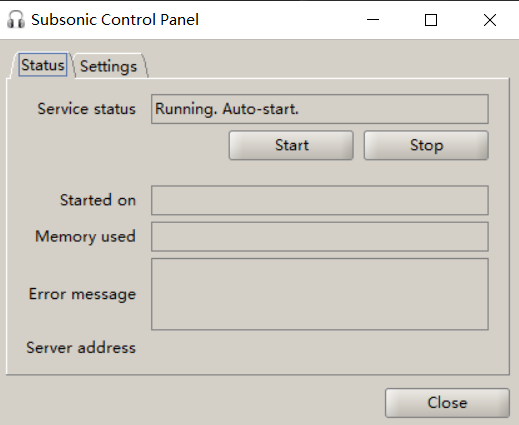
Subsonic Tray Icon occasionally turn into red color. The control panel shows service status is running, but [memory uesd][started on][server address] do not show up. How should I fix it.

Re: Subsonic Tray Icon turn into red
Posted:
Sun Jan 29, 2023 2:02 amby MacTech
I really wish anyone would answer this too ...
Re: Subsonic Tray Icon turn into red
Posted:
Sun Jan 29, 2023 12:07 pmby G8DHE
Have you tried hitting the STOP button, and then START again once it has updated ? I sometimes do it from the Services App as a few times it hasn't responded.
Re: Subsonic Tray Icon turn into red
Posted:
Fri Mar 17, 2023 8:58 amby asukatabito
MacTech wrote:I really wish anyone would answer this too ...
By now I can only confirm that this has something to do with the VPNs in my environment, but I have not figured out the specific reasons. I guess using SSLVPN might cause this phenomenon.
Re: Subsonic Tray Icon turn into red
Posted:
Fri Mar 17, 2023 4:22 pmby MacTech
Could also be a Windows Firewall issue... During the entire time of one of the recent Updates my tray icon was also Red, but I still had access from outside the house/WAN - but NOT from inside on my own LAN. I worked furiously to troubleshoot and figure out why, I even deleted and uninstalled Subsonic several time and reinstalled it and NOTHING fixed the red tray icon issue. I finally called Microsoft after reading about the millions of others that had similar issues all related to "patches" in the updated Firewall, lo-and-behold the next update that rolled out fixed THAT issue and Subsonic is back to running as it should or as expected, with a green tray icon.