Page 1 of 2

Setting up from a networked PC

PostPosted: Tue Jul 28, 2009 12:41 am
by jmulvihill3
So, I've gone and set up a dyndns.org host IP and downloaded the fancy program that updates your IP address as my ISP changes it. So now what? I'm on port 80. When I attempt to enter the domain name in my browser it takes me to my router log-in screen. Is it because I'm attempting to log in from this side of the network? It is redirecting me to my external IP address (which seems to be my router log-in screen...)

Maybe I don't know how to port forward? I've set it up as a TCP protocol to receive and sent through port 80.

I use FIOS (verizon's router/software) and I have Vista64.

I almost thought I knew what I was doing up to this point.

PostPosted: Tue Jul 28, 2009 2:16 am
by jmulvihill3
I've got an update... I've read about every thread related to this topic through the help forum. I've had more ports scanned.

<ip address>:<port>/subsonic takes me to a page load error

Clicking on the //localhost:<port>/subsonic link in the taskbar icon gets me to the log-in screen (only way for me to get there atm)

Even though subsonic is already an exception within my firewall, I've created another exception just for the port I've chosen.

I've determined that all that domain name got me was a direct link to my router. Trying <domain>.dyndns.tv:<port>/subsonic brings me to a 404 Error (so does <donmain>.dyndns.tv:<port>.) So I'm pretty sure that isn't going to get me anywhere at the moment. I'd like to just get my IP address to work first.

PostPosted: Tue Jul 28, 2009 2:48 am
by mixmaster
You need to configure your router to forward the port you wish to use. If you wish to use port 80 for subsonic, you will need to forward port 80 to the computer running subsonic. You will no longer be able to configure your router directly from outside of your network.
________

Re: Setting up from a networked PC

PostPosted: Tue Jul 28, 2009 4:16 am
by M0NG0
jmulvihill3 wrote:When I attempt to enter the domain name in my browser it takes me to my router log-in screen. Is it because I'm attempting to log in from this side of the network?


Yes, if you try accessing your external IP from inside your LAN you will end up at the external-facing device (i.e., your modem). If you want to access your Subsonic from inside your LAN with a dyndns address you will need to edit your hosts file (C:\Windows\System32\drivers\etc\hosts). Open up the hosts file in notepad and add the following line:

127.0.0.1 [your_dyndns_subdomain].dyndns.org

This line makes your computer send all traffic destined for [your_dyndns_subdomain].dyndns.org to 127.0.0.1 (your local machine).

If you want to access your Subsonic from another computer inside your LAN (i.e., not the same computer it's installed on), and want to use the [your_dyndns_subdomain].dyndns.org URL, then you will need to modify the hosts file on that computer as well - only use the IP of the computer that's running subsonic instead of 127.0.0.1. For example, your Subsonic is installed on a computer with an IP of 192.168.0.2, and you want to access it from a laptop inside your LAN that has an IP of 192.168.0.100. You will need to add the following line to the hosts file on the laptop:

192.168.0.2 [your_dyndns_subdomain].dyndns.org

Note: if you take that laptop outside your LAN you will need to comment out (add # at the beginning of the line) or delete that line, otherwise you won't be able to reach your Subsonic from outside the LAN.

Also, you should give the computer that's running Subsonic a static IP, otherwise your port mapping will break if the computer is issued a different IP than the one that's getting port 80 traffic forwarded to it.

PostPosted: Tue Jul 28, 2009 9:36 am
by jmulvihill3
That figures, I had a feeling that attempting to access from behind the router was my problem.

Router is definitely set up to port forward on the port I have set up with subsonic.

Firewall has both subsonic and the chose port set up as exceptions.

As for the static IP address, I thought I could avoid that with the program I downloaded that updates the domain I've created with my IP address periodically? (that's what I've read from some other threads in here, at least)

I'm going to make an attempt to connect from work today (the reason I downloaded this in the first place) and see what happens.

Thank you all for your comments. Hopefully everything works; just wish I could test from here.

PostPosted: Tue Jul 28, 2009 7:36 pm
by jmulvihill3
Yes, if you try accessing your external IP from inside your LAN you will end up at the external-facing device (i.e., your modem).


So, as it turns out, it had absolutely nothing to do with being behind the router. I attempted to log in from work today and it took me to my router log-in screen.

I obviously have no clue how to port-forward as I can't imagine the problem being anything else. If anyone knows any good sites that may explain port forwarding I would appreciate that.

It looks easy enough and there aren't very many options... I pick the device to port forward to, I select a protocol (TCP), and I pick the incoming/outgoing port... There's nothing else for me to do. The ports match on all of my exceptsions, within the subsonic program itself, and the port I'm forwarding. I've set my router up to have a static IP address assigned (i.e. 192.168.0.2) just in case it's not reassigning a different extension than what I'm port forwarding to.

So either this easy process is MUCH harder than it appears, or my ISP (FIOS) is screwing with me... Any assistance would be great, my job is stressful and the music would be more than welcomed!

Thanks all![/quote]

PostPosted: Tue Jul 28, 2009 10:21 pm
by jigsaw
Log in to the router admin interface and see whether you may disable remote management. If remote management is active it may perhaps force all requests on the external ip address and port 80 to be handled by the routers web-server instead of going through the port-forwarding.

Tip: I found the setting on my Linksys here: Administration -> Remote Access -> Remote Management

PostPosted: Wed Jul 29, 2009 4:22 am
by M0NG0
jmulvihill3 wrote:I've set my router up to have a static IP address assigned (i.e. 192.168.0.2) just in case it's not reassigning a different extension than what I'm port forwarding to.


Make sure your forwarding port 80 to the IP of the computer hosting Subsonic, not the IP of your router. Your Subsonic computer should have a static IP. As far as I know, your router doesn't need a static IP.

Also, follow Jigsaw's advice about disabling remote management.

jmulvihill3 wrote:As for the static IP address, I thought I could avoid that with the program I downloaded that updates the domain I've created with my IP address periodically? (that's what I've read from some other threads in here, at least)


Yep, you're right - the dyndns updater client is used to update external DNS servers with your current IP. However, when I was talking about assigning a static IP, I was referring to the computer hosting Subsonic inside your LAN.

PostPosted: Wed Jul 29, 2009 12:44 pm
by jmulvihill3
Thank you for the tip Jigsaw. I found what you were talking about and I saw two rules that were checked off under remote management:

One had something to do with port forwarding information to port 80 (I'm sorry I don't recall exactly what it said as I'm at work!) I unchecked this selection.

The other was allowing external services through for pinging and stuff like that. I left this alone.

Also, I reset everything back to port 80 (was using a different port number.) As I was setting up an exception for port 80 in my windows firewall, it gave me an error. Windows Media Player (Orb) was assigned to port 80. I changed the windows media player port to something else and continued setting up the exception for port 80.

I did some more digging through my router last night. There is an option to set up a Static NAT. I chose my PC as the device, set up my current external IP as the static IP and then it gave me the option to set up a port forwarding protocol when information is received in this static external IP. I set up a subsonic TCP protocol to port forward to port 80.

When I got to work this morning I went and checked it out. It is no longer taking me to my router log-in screen (thank goodness) it is now saying that there is a network (TCP) error and that the connection failed. So I solved one problem but now I'm in another.

Should I do away with the Static NAT that I set up and attempt the port forwarding configuration again? (I can't have both as it creates a conflict within my router) This is getting frustrating.

Oh, another thing I notice is all of my ports are 'closed'. I d/l'd some software that is supposed to check a specified port's status under TCP or UDP. When the music streamer is turned on I receive an error on port 80 (being used by a program) and when I turn off the streamer it says the port is closed/unaccessable. I'm not sure if this is a factor.

PostPosted: Wed Jul 29, 2009 3:15 pm
by jigsaw
Seems you are getting closer. A couple of things though.
To simplify I'll use an example of my own network:
Start -> Run -> "cmd"
Code: Select all
>ipconfig

Windows IP Configuration


Ethernet adapter Local Area Connection 11:

        Connection-specific DNS Suffix  . :
        IP Address. . . . . . . . . . . . : 192.168.1.100
        Subnet Mask . . . . . . . . . . . : 255.255.255.0
        Default Gateway . . . . . . . . . : 192.168.1.1


Here you see that my internal ip is 192.168.1.100 and my router has the internal ip of 192.168.1.1 ( my external ip is something else which you already have configured with dyndns so I wont bother explaining that :) )

jmulvihill3 wrote:One had something to do with port forwarding information to port 80 (I'm sorry I don't recall exactly what it said as I'm at work!) I unchecked this selection.

The other was allowing external services through for pinging and stuff like that. I left this alone.

This seems correct yes. You will still be able to administer your router, but only from within your network using the local ip-address ( 192.168.1.1 )

jmulvihill3 wrote:Also, I reset everything back to port 80 (was using a different port number.) As I was setting up an exception for port 80 in my windows firewall, it gave me an error. Windows Media Player (Orb) was assigned to port 80. I changed the windows media player port to something else and continued setting up the exception for port 80.

You need to make sure that Subsonic is listening on port 80 ( or Apache if you have that in front of Subsonic ).

Code: Select all
>netstat -ano | find "LISTENING" | find "80"
  TCP    0.0.0.0:80            0.0.0.0:0              LISTENING       1412


This means that process id 1412 is listening on TCP port 80 on all interfaces ( ip 0.0.0.0 just means "all" if you should have multiple interfaces )
Now you either have subsonic running directly on port 80 or you should see both port 80 and 8080 ( the default tomcat port ) in the list above. Use the task manager to find out what is listening to port 80 by tracking down the pid 1412.

To set up Task Manager to show the PID column open Task Manager by using CTRL+SHIFT+ESC. Go to the Processes tab, click View and then Select Columns. In the Select Columns windows click to select PID and then click Ok. You can sort the PID column to display the PIDs in descending or ascending order.

jmulvihill3 wrote:I did some more digging through my router last night. There is an option to set up a Static NAT. I chose my PC as the device, set up my current external IP as the static IP and then it gave me the option to set up a port forwarding protocol when information is received in this static external IP. I set up a subsonic TCP protocol to port forward to port 80.

Should I do away with the Static NAT that I set up and attempt the port forwarding configuration again? (I can't have both as it creates a conflict within my router) This is getting frustrating.


Static NAT means that you assign a static internal ip to one computer, keyword being internal. This is not mandatory, but smart if you have several computers and want to make sure that your port forwarding rules always work. Check which internal ip your computer running subsonic has right now and set that as the static NAT ( mine is 192.168.1.100 from above )
Now when that's done you need to configure a port forwarding rule forwarding TCP port 80 to 192.168.1.100.

jmulvihill3 wrote:Oh, another thing I notice is all of my ports are 'closed'. I d/l'd some software that is supposed to check a specified port's status under TCP or UDP. When the music streamer is turned on I receive an error on port 80 (being used by a program) and when I turn off the streamer it says the port is closed/unaccessable. I'm not sure if this is a factor.


When all is done you should have port 80 open. I like to use Gibson Research Corporations ShieldsUP to check this. Go to http://www.grc.com/default.htm and click on ShieldsUP under Hot Spots, accept the warning and finally perform the "Common ports" check. That will tell what you need to know.

Alright, hope all this helps and that you're getting closer to be able to enjoy subsonic from your working place :)

-jigsaw

PostPosted: Wed Jul 29, 2009 10:06 pm
by jmulvihill3
First I would just like to thank you Jogsaw for all of this.

Second; I seem to be back to square one but I seem to like it in some sadistic kind of way...

The Static NAT function does not seem to work as you had stated.

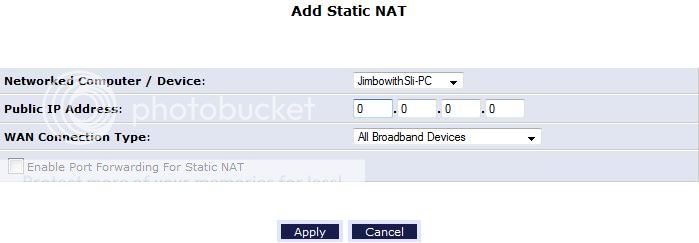
Image

I've set up a photobucket account to help me out with all of this! :shock:

When I click on 'add' I'm brought to this screen. The first option is to select a device (my PC) or I can specify an IP address.

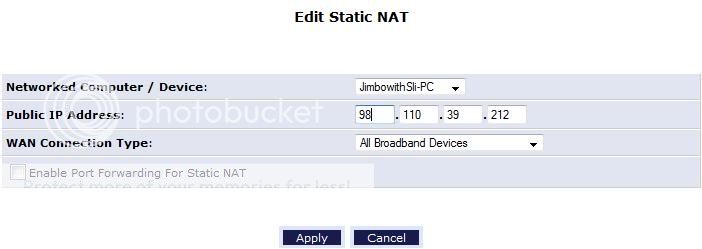
Image

Image

As you can see it then asks for a 'Public' IP address. After reading your note about the Static NAT being used for an internal IP address I changed it from the IP you see in this picture to my router assigned IP address After doing so I no longer had access to the internet. Is it possible that this is actually for a static External or 'Public' IP address and not internal?

This just makes me wonder if I should even screw with it because I have the dyndns.org domain and IP updater running; seems like over kill.

Anyway, moving on to port forwarding and the other info you've provided.

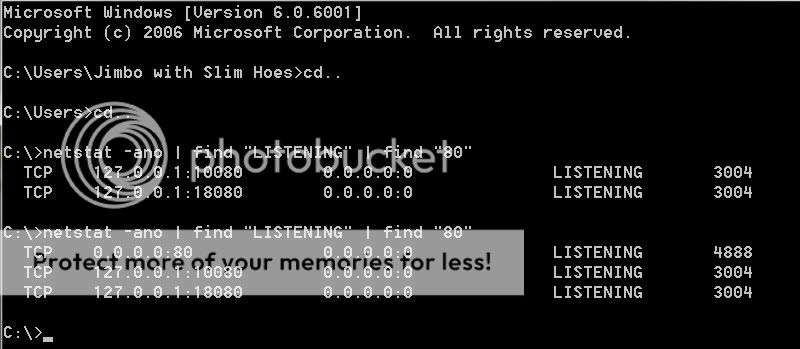
I ran the code you mentioned in command prompt with the two following results:

Image

The first result was when I had the Subsonic Tray Icon 'stopped'.

The second result was with it running on port 80.

I checked the PID's in the Services section of the Task Manager and found that subsonic was PID 4888 (matching the port from the second report). I assume that this means that Subsonic is listening on port 80. I also assume that no other program is listening on port 80 or there would either be a conflict or multiple PID's listed here that aren't 127.0.0.1: etc... (Correct me if I'm wrong)

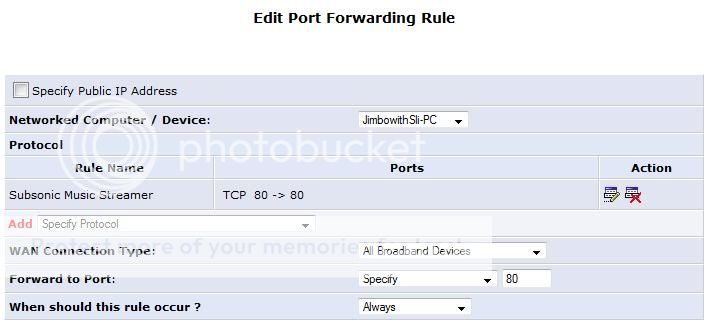
So here is a synopsis of how I have the port forwarding set up:

Image

Finally, port 80 is still listed as closed or unreachable. Needless to say I'm frustrated.

PostPosted: Wed Jul 29, 2009 10:55 pm
by jigsaw
Hi again

It looks like you've got everything but the port forwarding setup. That would cause any online tool to present the port 80 as closed or unreachable. At this point I can see that the router you are using is quite different from any I have ever used. So I suggest you basically google "port forwarding" and the name of the router and see if you find out what you are doing wrong.

Hope that helps

-jigsaw

Re: Setting up from a networked PC

PostPosted: Wed Jul 29, 2009 11:12 pm
by jmulvihill3
M0NG0 wrote:Yes, if you try accessing your external IP from inside your LAN you will end up at the external-facing device (i.e., your modem). If you want to access your Subsonic from inside your LAN with a dyndns address you will need to edit your hosts file (C:\Windows\System32\drivers\etc\hosts). Open up the hosts file in notepad and add the following line:

127.0.0.1 [your_dyndns_subdomain].dyndns.org

This line makes your computer send all traffic destined for [your_dyndns_subdomain].dyndns.org to 127.0.0.1 (your local machine).


On a brighter note, I've done exactly as MONGO instructed in this quote and, by adding that line, am able to log right into subsonic by typing my domain.dyndns.org address into my web browser.

Does this mean it may be set up correctly, but my work has some type of network security preventing me from accessing?

PostPosted: Thu Jul 30, 2009 6:32 am
by deriksen
Afraid not. What you have done, is ask your computer to reroute all traffic bound for your dyndns address to the computers internal IP, or rather the IP assigned for "this computer". It's commonly referred to as localhost.

Then again, your office may still have firewalls preventing you from accessing subsonic running on specific ports.

PostPosted: Thu Jul 30, 2009 6:00 pm
by jmulvihill3
So, I thought I had it. I disabled that code I put into the hosts file mentioned in my previous e-mail so that isn't causing the problem.

I've taken Jigsaw's advice and found a detailed line by line instruction manual for how to set-up port forwarding on my particular router. I did a lot of things incorrectly. Even so, it still doesn't work. Connection times out when I attempt to connect from work.

I think I'm on the verge of giving up and buying myself a very large, very portable, external hard drive... I honestly cannot figure out what could possibly be wrong here.

Is it Vista? (I hate Vista) Are there other firewalls I'm not aware of? How about programs like adaware, spybot, and AVG Free? Will they cause any conflicts?

Thanks again all!