Page 1 of 1

Error message on video play

PostPosted: Tue Feb 01, 2011 2:09 am
by enorym
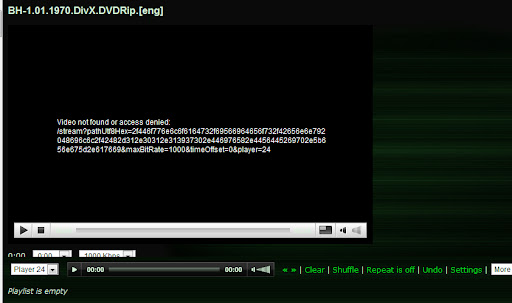
Not on all but some of my videos I receive an error message like the screen shot attached.

Using:
Version 4.3 (build 2078) – January 7, 2011
Server jetty-6.1.x, java 1.6.0_22, Mac OS X (51.3 MB / 75.1 MB)

Client using: Chrome and IE both had the same error.
Image

PostPosted: Tue Feb 01, 2011 3:24 am
by GJ51
What file type is this? What file extension? Do you have it entered in the Video Mask? What is your transcoding settinge for this file type?

Thanks for your reply.

PostPosted: Tue Feb 01, 2011 8:27 pm
by enorym
GJ51 wrote:What file type is this? What file extension? Do you have it entered in the Video Mask? What is your transcoding settinge for this file type?


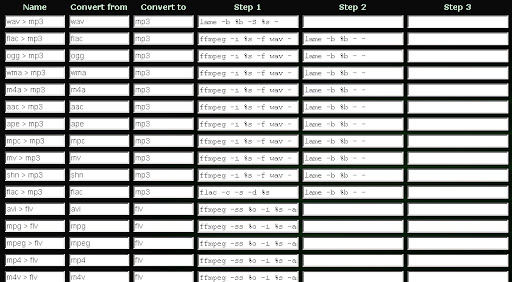
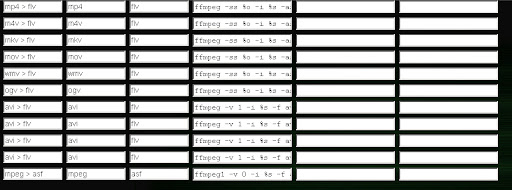
Some are AVI, mp4, m4v, and some mkv. Im not sure what you mean by "Do you have it entered in the Video Mask?"...elaborate and I can tell ya.

Image

Image

PostPosted: Tue Feb 01, 2011 9:11 pm
by GJ51
Well, your original post shows a particular file that has failed. Without knowing which files work and which fail, it becomes a bit of a challenge to determine what your particular problem is. Occasionally, users forget to add an extension to the list in the Video Mask found under Settings/General. If the file you're trying to play is in the mask and displays as a selection properly, but still won't play properly in the viewer, then it's usually a transcoding issue.

Here are my current transcoding settings that seem to work very well.

Default Transcoding for video:

ffmpeg -ss %o -i %s -async 1 -b %bk -s %wx%h -ar 44100 -ac 2 -v 0 -f flv -

Stozher: mp4 > flv transcoding:

ffmpeg -v 0 -ss %o -async 1 -i %s -f flv -b %bk -r 30 -s %wx%h -acodec copy -

If you have a problem with a particular file type, I would suggest checking to see if the transcoding matches the default. If it does, but the file still won't play, then plug in Stozher's settings to see if it fixes the problem.

PostPosted: Tue Feb 01, 2011 9:28 pm
by enorym
Thank you again...Ill give it a shot as soon as I get home.


GJ51 wrote:Well, your original post shows a particular file that has failed. Without knowing which files work and which fail, it becomes a bit of a challenge to determine what your particular problem is. Occasionally, users forget to add an extension to the list in the Video Mask found under Settings/General. If the file you're trying to play is in the mask and displays as a selection properly, but still won't play properly in the viewer, then it's usually a transcoding issue.

Here are my current transcoding settings that seem to work very well.

Default Transcoding for video:

ffmpeg -ss %o -i %s -async 1 -b %bk -s %wx%h -ar 44100 -ac 2 -v 0 -f flv -

Stozher: mp4 > flv transcoding:

ffmpeg -v 0 -ss %o -async 1 -i %s -f flv -b %bk -r 30 -s %wx%h -acodec copy -

If you have a problem with a particular file type, I would suggest checking to see if the transcoding matches the default. If it does, but the file still won't play, then plug in Stozher's settings to see if it fixes the problem.
:D

PostPosted: Tue Feb 01, 2011 11:53 pm
by stozher
Good choice for frame rate is a "-r 23.976"... :wink:

PostPosted: Wed Feb 02, 2011 1:22 am
by GJ51
Thanks again Stozher. As always I am amazed and humbled by your expertise and willingness to share! :D I'll test it when I can.

PostPosted: Wed Feb 02, 2011 4:03 pm
by enorym
I tried your suggested transcoder's...some videos worked others just laughed and said no.

PostPosted: Wed Feb 02, 2011 6:09 pm
by stozher
Open terminal window and post result from: ffmpeg -i <filename>