
If you can figure that out then you are good to go. I might try and check the modem itself and see if there some browser address specified.
Keep posting back here with whatever you find out. I'll check this post out in the morning and see if we can get this figured out.
Before I go to sleep though, try 192.168.100.1.
Dlink DIR-655 Port Forwarding still incorrect
Moderator: moderators
63 posts
• Page 2 of 5 • 1, 2, 3, 4, 5
 by Falcon5783 » Fri Jul 15, 2011 5:46 am
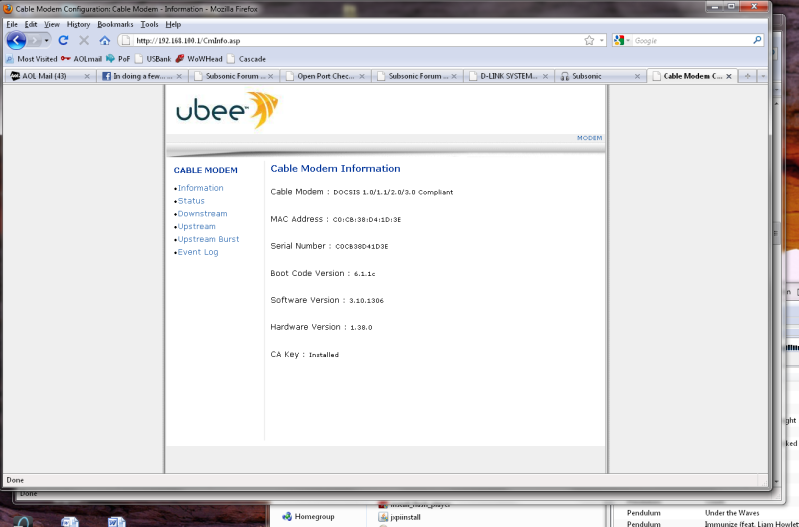
Sonuva... 192.168.100.1 did it... that pulled up the modem info page, I just have to find the login now
- Falcon5783
- Posts: 30
- Joined: Fri Jul 15, 2011 4:13 am
by Falcon5783 » Fri Jul 15, 2011 5:48 am
No management/settings to change there, it's all just status/upstream/downstream information. I may have to call in to comcast in the morning
- Falcon5783
- Posts: 30
- Joined: Fri Jul 15, 2011 4:13 am
by dcuellar » Fri Jul 15, 2011 6:00 am
One more thing. Try logging in with admin as the username, and "cableroot" as the pass on the Ubee. See if there are any options listed there.
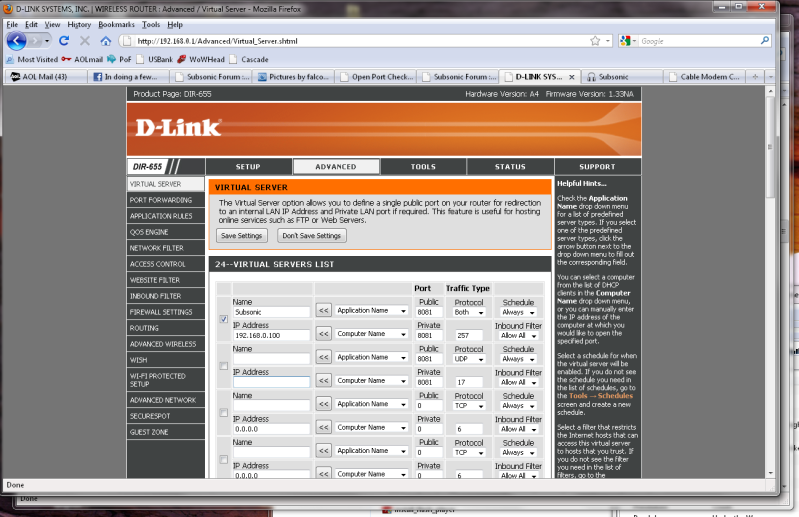
Also, If you wanna post screens of your DLink port forwarding and host PC static IP set up I will gladly take a look at them and see if there is anything wrong with them.
Also, If you wanna post screens of your DLink port forwarding and host PC static IP set up I will gladly take a look at them and see if there is anything wrong with them.
- dcuellar
- Posts: 97
- Joined: Sat Feb 05, 2011 3:23 pm
by Falcon5783 » Fri Jul 15, 2011 6:01 am
I've read somewhere, I don't recall where, that the Dlink has to have two IP forwards setup. One from the modem to the router, and then from the router to the PC. I don't know that this is accurate, let alone how I would do that. My understanding is that what Virtual Server/Port forwarding does; when a request hits the router, the router checks the port # and forwards it to the corresponding IP address per the rules set
- Falcon5783
- Posts: 30
- Joined: Fri Jul 15, 2011 4:13 am
by dcuellar » Fri Jul 15, 2011 6:14 am
Falcon5783 wrote:I've read somewhere, I don't recall where, that the Dlink has to have two IP forwards setup. One from the modem to the router, and then from the router to the PC.
If your modem had a NAT, you would do that. We have determined though that your modem does not.
- dcuellar
- Posts: 97
- Joined: Sat Feb 05, 2011 3:23 pm
by Falcon5783 » Fri Jul 15, 2011 6:17 am
I've tried both port forwarding and virtual server with the same results, "Reason: Connection timed out." Virtual server is for specific port #s, Port forwarding you can put in multiple/ranges of ports.
- Falcon5783
- Posts: 30
- Joined: Fri Jul 15, 2011 4:13 am
by Falcon5783 » Fri Jul 15, 2011 7:02 am
I haven't tried anything under admin yet. I tried to login, but I think the user login session hasn't timed out, and there isn't a logout option it seems. I'll check it again tomorrow, hopefully with better luck.
I also emailed Dlink support saying virtual server wasn't allowing my port through and all I got back was a response telling me how to put in the information I told them is already entered
I also emailed Dlink support saying virtual server wasn't allowing my port through and all I got back was a response telling me how to put in the information I told them is already entered
- Falcon5783
- Posts: 30
- Joined: Fri Jul 15, 2011 4:13 am
63 posts
• Page 2 of 5 • 1, 2, 3, 4, 5
Who is online
Users browsing this forum: No registered users and 43 guests