Dlink DIR-655 Port Forwarding still incorrect

Need help? Post your questions here.

Moderator: moderators

Postby frason » Fri Jul 15, 2011 7:58 am

You only need to add it in Virtual Server, nowhere else, exactly like this (TCP/6);
Image

Just change the ports to what you use for SubSonic.

If that doesn't work, the issue is with something else, modem/ISP/computer firewall or something.
frason
 
Posts: 16
Joined: Mon Jul 05, 2010 7:24 am

Postby dcuellar » Fri Jul 15, 2011 1:34 pm

You can also try logging in from a different browser if you can't find a way to log off.
dcuellar
 
Posts: 97
Joined: Sat Feb 05, 2011 3:23 pm

Postby dcuellar » Fri Jul 15, 2011 3:05 pm

Falcon, I re-read your original post and saw that you said you are setting up subonic with port 8089, yet you have it set up on the screenshot with port 8081.

I would follow Frason's example above. Hopefully that will help.
dcuellar
 
Posts: 97
Joined: Sat Feb 05, 2011 3:23 pm

Postby Falcon5783 » Sat Jul 16, 2011 12:17 am

Dcuellar, I have everything set to 8081 currently. I've tried a few different port numbers hoping it was just a problem with the port #, but all the information has matched each time I changed it.

I got into the admin menu of my cable modem, but there is only an option to reset the modem and an option to factory reset the modem.

frason, I entered the information you posted, changed the public port number to 8081 (as 8080 is used already by my router, and my subsonic is setup on 8081), and still don't seem to get any communication. Where do you set the private port number? Do I need to go into windows firewall and assign port 4443 for subsonic?

I've got a trouble call in to Comcast to try to find out if my modem is a bridge or if it is actually a router. Our IS guy at work said it was probably a router, and if that is the case, there could be a NAT/forwarding issue with it.
Falcon5783
 
Posts: 30
Joined: Fri Jul 15, 2011 4:13 am

Postby dcuellar » Sat Jul 16, 2011 12:37 am

Falcon5783 wrote:I've got a trouble call in to Comcast to try to find out if my modem is a bridge or if it is actually a router. Our IS guy at work said it was probably a router, and if that is the case, there could be a NAT/forwarding issue with it.


That's the assumption we were working on to begin with. I just don't think it's the modem given the fact that there are no options in your Ubee for DHCP or Port forwarding.

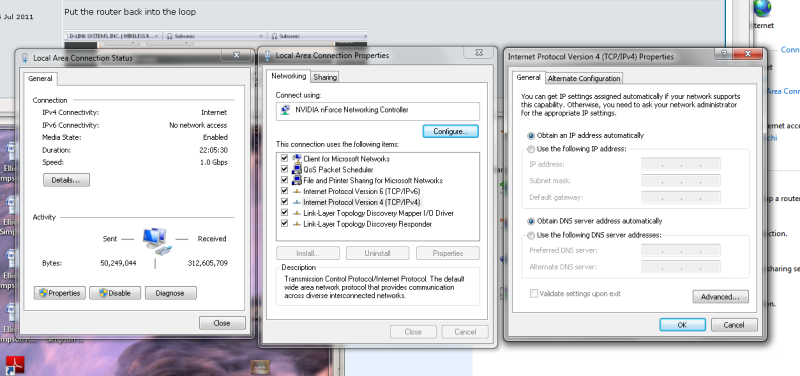
Any chance you can post a pic of your windows settings where you assigned the static IP?
dcuellar
 
Posts: 97
Joined: Sat Feb 05, 2011 3:23 pm

Postby Falcon5783 » Sat Jul 16, 2011 1:05 am

I just spoke with Comcast, the modem is just a modem, doesn't block any ports, but the tech didn't think it was acting as a bridge. He did say that everything got passed straight through the modem.

I pulled my router out of the equation temporarily and have my computer connected straight to the modem. I opened subsonic web interface and re-saved my network settings. I received status saying my URL is registered, but still unable to connect.

I'm trying to connect via my phone again right now, but I'm having issues still. I opened up my browser and typed in myname.subsonic.org and it successfully redirected to a new IP address, the same as is showing in /ipconfig with the right port (X.18.123.1205:8081) but it's still timing out. Also, canyouseeme.org is still returning time-out errors when testing port 8081

Is there any major difference in setup when connecting without a router? I'll post screenshots of the IP addressing once I get the router set back up
Falcon5783
 
Posts: 30
Joined: Fri Jul 15, 2011 4:13 am

Postby Falcon5783 » Sat Jul 16, 2011 1:12 am

Image
Falcon5783
 
Posts: 30
Joined: Fri Jul 15, 2011 4:13 am

Postby dcuellar » Sat Jul 16, 2011 1:14 am

Falcon5783 wrote:I just spoke with Comcast, the modem is just a modem, doesn't block any ports, but the tech didn't think it was acting as a bridge. He did say that everything got passed straight through the modem.

I pulled my router out of the equation temporarily and have my computer connected straight to the modem. I opened subsonic web interface and re-saved my network settings. I received status saying my URL is registered, but still unable to connect.

I'm trying to connect via my phone again right now, but I'm having issues still. I opened up my browser and typed in myname.subsonic.org and it successfully redirected to a new IP address, the same as is showing in /ipconfig with the right port (X.18.123.1205:8081) but it's still timing out. Also, canyouseeme.org is still returning time-out errors when testing port 8081

Is there any major difference in setup when connecting without a router? I'll post screenshots of the IP addressing once I get the router set back up


Taking the router out of the equation would take away the port forwarding. Your router is the one who is opening the ports so you will see that connection timed out error.

A better test would be to try a different router, but that should be a last resort.
dcuellar
 
Posts: 97
Joined: Sat Feb 05, 2011 3:23 pm

Postby dcuellar » Sat Jul 16, 2011 1:23 am

Falcon5783 wrote:Image


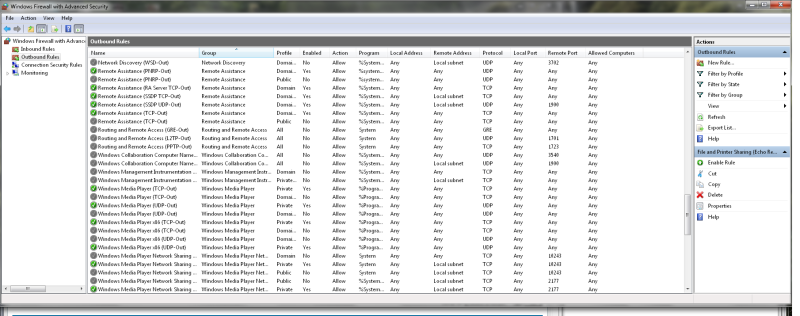
I'm assuming the outbound rules were done as well, right?

Also, please post a screen with the window showing your assignment of a static IP.

Control Panel > Network and Internet > Network and Sharing Center > Local Area Connection > Properties > Internet Protocol 4 > Properties (This is the screen I want to see)
dcuellar
 
Posts: 97
Joined: Sat Feb 05, 2011 3:23 pm

Postby Falcon5783 » Sat Jul 16, 2011 1:28 am
Put the router back into the loop

Image

Image
Last edited by Falcon5783 on Sat Jul 16, 2011 1:33 am, edited 1 time in total.
Falcon5783
 
Posts: 30
Joined: Fri Jul 15, 2011 4:13 am

Postby dcuellar » Sat Jul 16, 2011 1:32 am

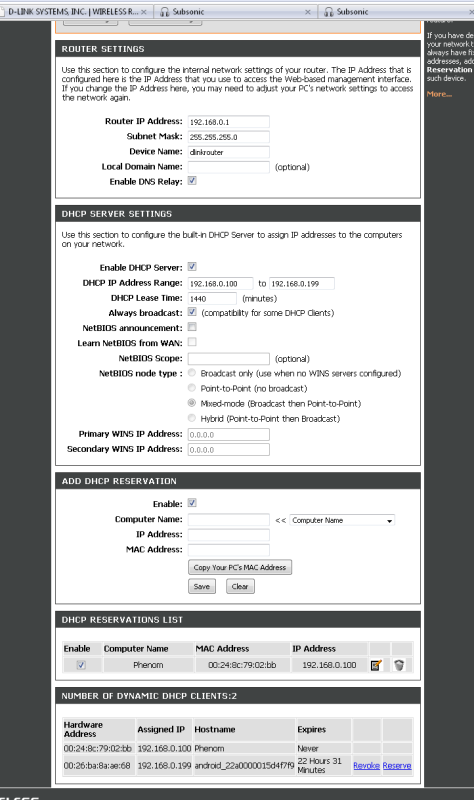
Your router screen shows that your DHCP range is from 192.168.0.100 to 192.168.0.199.

What is the static IP assigned to your computer? It has to be 192.168.0.200 or greater.
dcuellar
 
Posts: 97
Joined: Sat Feb 05, 2011 3:23 pm

Postby dcuellar » Sat Jul 16, 2011 1:34 am

I think I know what's going on...

Hold on. I'm gonna put together some steps.
dcuellar
 
Posts: 97
Joined: Sat Feb 05, 2011 3:23 pm

Postby Falcon5783 » Sat Jul 16, 2011 1:36 am
I have an exception in the router to always assign 192.168.0.100 to this PC based on its MAC address. I know it's not static IP addressing, but I thought that was the same effect?

I checked the outbound rules and can't seem to find anything there for subsonic...

Image
Falcon5783
 
Posts: 30
Joined: Fri Jul 15, 2011 4:13 am

Postby dcuellar » Sat Jul 16, 2011 1:58 am

Ok. Don't worry about the outbound rules for now. Let's set your static IP up the proper way. Do this. That exception in the router to always assign an address....delete it.

We are going to do this the other method...plus, you can't assign it an address within the range, it has to be an address outside of the range. So let's go ahead and just use 192.168.0.200 assuming you will leave your DHCP range intact.

Then you need to follow these steps. http://portforward.com/networking/static-win7.htm
dcuellar
 
Posts: 97
Joined: Sat Feb 05, 2011 3:23 pm

Postby Falcon5783 » Sat Jul 16, 2011 2:06 am

Took out the exception, turned off DHCP on my local machine and assigned it 192.168.0.200
Falcon5783
 
Posts: 30
Joined: Fri Jul 15, 2011 4:13 am

PreviousNext

Return to Help

Who is online

Users browsing this forum: No registered users and 24 guests