

Just change the ports to what you use for SubSonic.
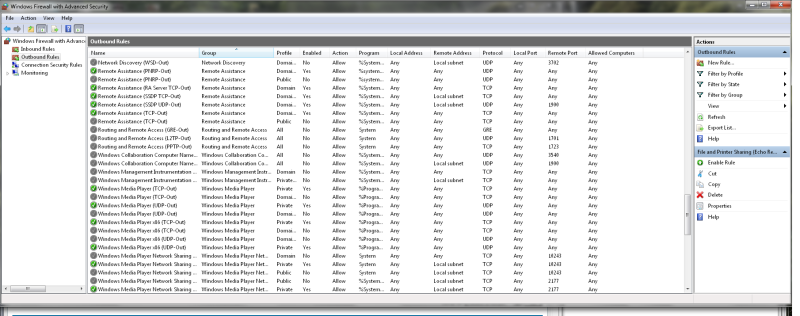
If that doesn't work, the issue is with something else, modem/ISP/computer firewall or something.
Moderator: moderators
 by frason » Fri Jul 15, 2011 7:58 am
by dcuellar » Fri Jul 15, 2011 3:05 pm
by Falcon5783 » Sat Jul 16, 2011 12:17 am
by dcuellar » Sat Jul 16, 2011 12:37 am
Falcon5783 wrote:I've got a trouble call in to Comcast to try to find out if my modem is a bridge or if it is actually a router. Our IS guy at work said it was probably a router, and if that is the case, there could be a NAT/forwarding issue with it.
by Falcon5783 » Sat Jul 16, 2011 1:05 am
by dcuellar » Sat Jul 16, 2011 1:14 am
Falcon5783 wrote:I just spoke with Comcast, the modem is just a modem, doesn't block any ports, but the tech didn't think it was acting as a bridge. He did say that everything got passed straight through the modem.
I pulled my router out of the equation temporarily and have my computer connected straight to the modem. I opened subsonic web interface and re-saved my network settings. I received status saying my URL is registered, but still unable to connect.
I'm trying to connect via my phone again right now, but I'm having issues still. I opened up my browser and typed in myname.subsonic.org and it successfully redirected to a new IP address, the same as is showing in /ipconfig with the right port (X.18.123.1205:8081) but it's still timing out. Also, canyouseeme.org is still returning time-out errors when testing port 8081
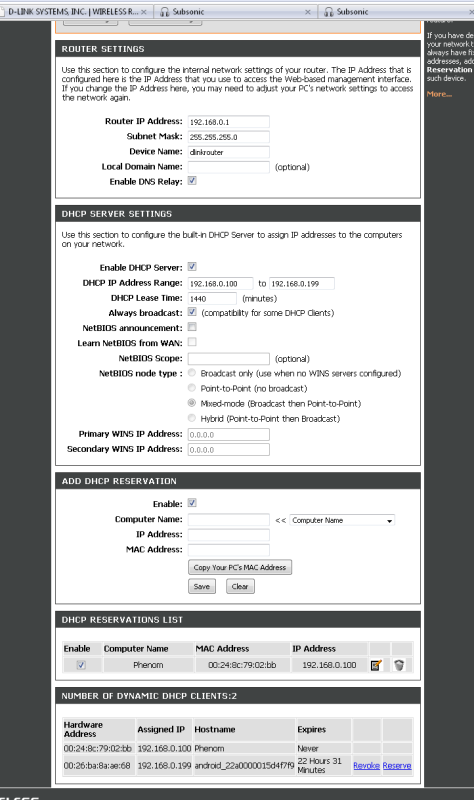
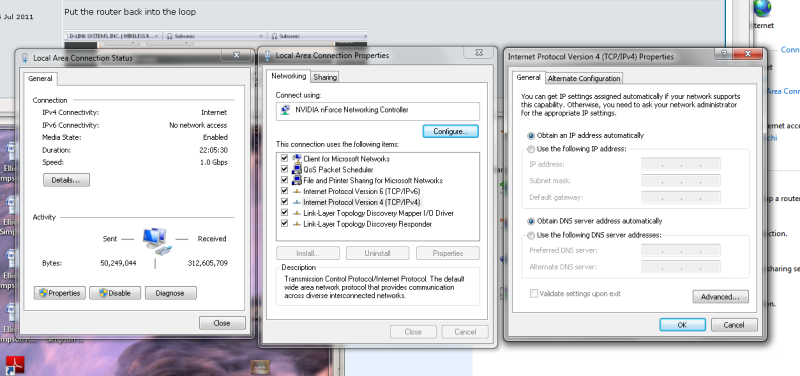
Is there any major difference in setup when connecting without a router? I'll post screenshots of the IP addressing once I get the router set back up
by dcuellar » Sat Jul 16, 2011 1:23 am
Falcon5783 wrote:
by Falcon5783 » Sat Jul 16, 2011 1:28 am
by Falcon5783 » Sat Jul 16, 2011 1:36 am
by dcuellar » Sat Jul 16, 2011 1:58 am
by Falcon5783 » Sat Jul 16, 2011 2:06 am
Users browsing this forum: No registered users and 15 guests
